Quick Notes App Local AI Features
Quick Notes App’s local AI features empower you with offline transcription and chat, customizable AI models, and privacy-first design—all while adapting to your device’s capabilities for the best experience.
What is Local AI?
Local AI refers to artificial intelligence models that run directly on your device without needing an internet connection. This means your data stays private, and you can use AI-powered features even when offline.
How Quick Notes App Uses Local AI
Quick Notes App integrates local AI to provide offline transcription and chat capabilities. When you record audio, the app transcribes it using AI models running on your device. You can also chat with the AI locally for note-taking assistance, brainstorming, or quick answers.
Choosing Your AI Model
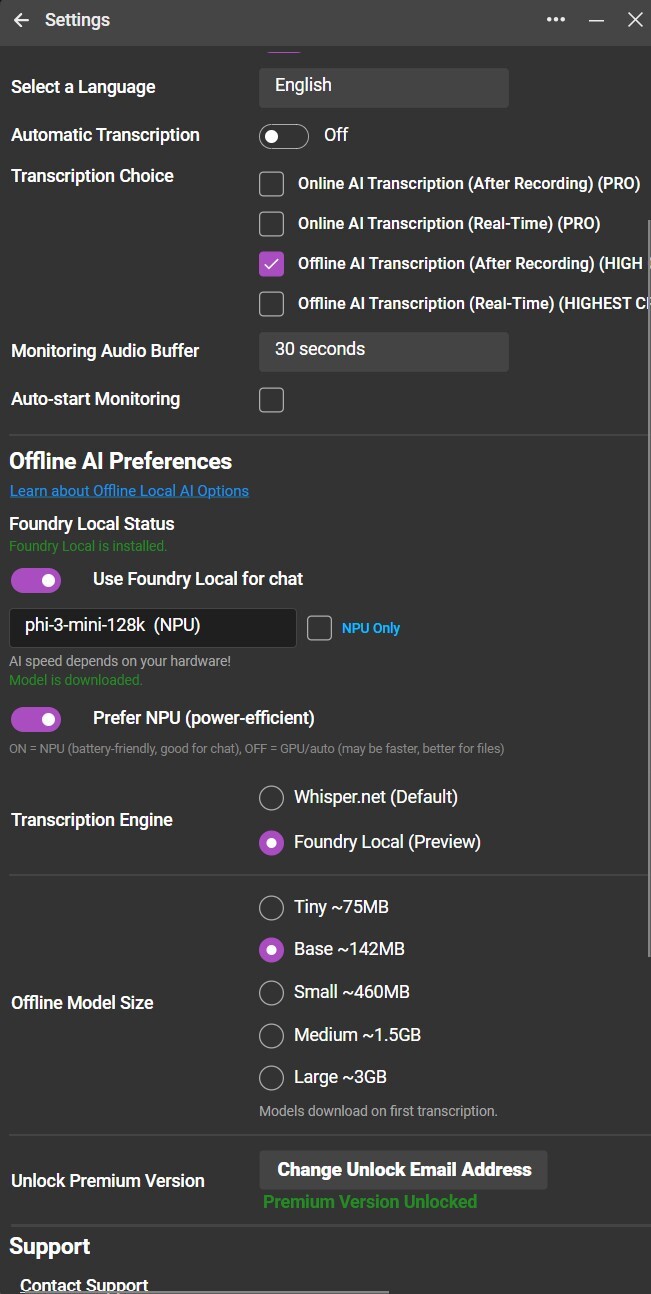
You can select from different AI models within the app. Models vary in size and performance:
-
CPU models: Smaller and slower, suitable for devices without specialized hardware.
-
NPU/GPU models: Larger and faster, leveraging your device's neural processing or graphics units for better performance.
Larger models provide more accurate and nuanced results but may run slower depending on your device's hardware.
Performance Considerations
Running AI models locally can be resource-intensive. Depending on your device's CPU, NPU, or GPU capabilities and the model size you choose, transcription and chat responses might take longer than cloud-based AI services. If you have a GPU then you can try any of the models in the settings. If your machine has an NPU then perhaps choose one of those - but note in our experience the NPU is not necessarily faster than the GPU - but it is more power efficient for tasks like normal chat. If you are processing a PDF file for instance try to use the GPU setting. Doing Local AI really does need a machine with lots of RAM but with Quick Notes App you can be confident that you can run a small Offline AI model even when you are not connected - or on a plane! We’ve tried the phi-3-mini model and its very good. Results might take a few seconds but it’s all local! We’ve even included the ability to process PDF and .docx files locally but performance for large amounts of text really needs a GPU.
Setup and Installation
When you first start Quick Notes App, if the required AI runtime environment is not installed, the app will automatically install it in the background. This process is seamless and designed to keep the underlying technology unobtrusive to your experience.
Enjoy the power of AI while keeping your data private and accessible anytime with Quick Notes App!
